How to Create an Email Signature with Logo on AOL Mail

Don’t underestimate the importance of a well-presented signature at the bottom of your emails. It conveys professionalism and increases awareness for your brand, so make sure you add a logo as well.
It is very straightforward to create a signature in AOL mail. Here is how:
Go to your AOL Mail and login.
On the top right-hand corner, click on Options and choose Mail Settings.
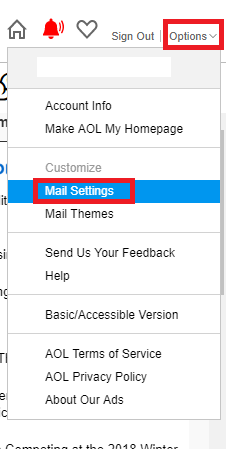
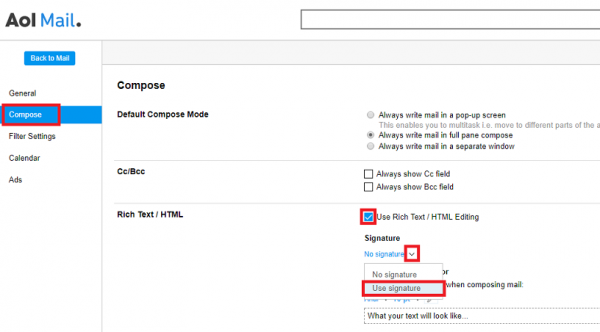
Click Compose on the left menu.
Check Use Rich Text / HTML Editing on the right column. Just below it, click the Signature dropdown and choose Use Signature.
Create your signature in the text box, and change formatting as required.
Copy and paste your logo directly in the box.
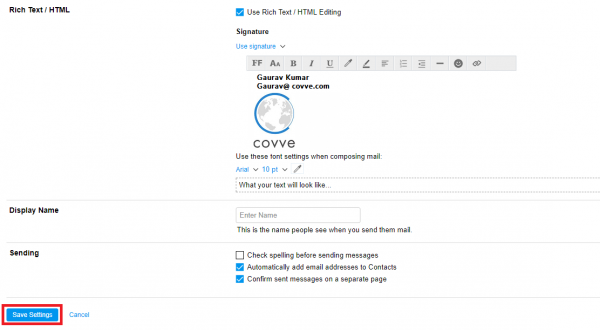
Note that you can paste a ready-made signature directly in the text box or even paste an HTML.
Once done click Save Settings and you are done!
Want to create an electronic business card or your own QR code to quickly share your profile? Covve allows you to quickly share contact details and makes sure your contacts are always up to date. Find out more about Covve.