How to Refresh WhatsApp Contacts on iPhone
After installing WhatsApp on your iPhone, do you see numbers instead of the names of your contacts? Are there contacts that should be on your WhatsApp contacts list that can’t be seen or accessed? Sometimes, iPhone users face problems like these.
These issues can be frustrating and can make communication through the app stressful and challenging. However, before you start worrying about not being able to find your contacts, relax and read on. We are going to share with you the best ways to refresh WhatsApp contacts on your iPhone!
1)Refresh contacts on WhatsApp
One easy way to fix this problem is by refreshing your WhatsApp. Thankfully, the way to get this done is quite easy and straightforward. More often than not, this refreshing process is done automatically with new updates.
To manually refresh WhatsApp contacts on your iPhone, follow the steps below:
- Open WhatsApp.
- Tap on the “Chats” tab at the bottom of your screen.
- Scroll to the top of the chats list and pull down the list with your finger.
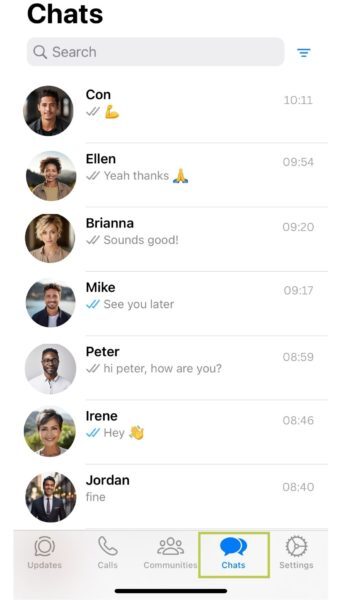
Your WhatsApp contacts should now be refreshed.
2)Give WhatsApp permission to access your contacts
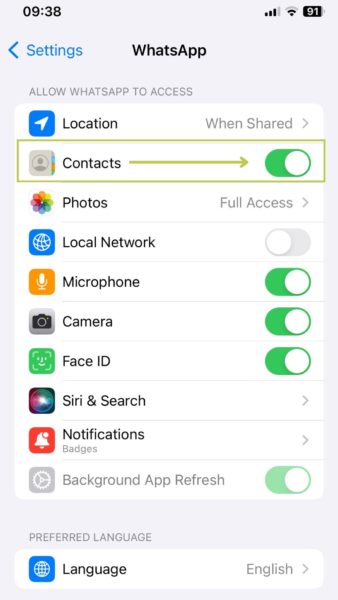
If you are still unable to view your contacts, even after the refresh, there’s a chance that you haven’t given WhatsApp permission to access your contacts in your iPhone Settings. To confirm whether you have given WhatsApp permission to access your contacts, follow the steps below:
- Go to Settings.
- Select “WhatsApp” from the list.
- Ensure that the “Contacts” permission is turned on.
3)Update WhatsApp
If you are running an outdated version of WhatsApp on your iPhone, it is possible that you may encounter some issues. Therefore, it is important to ensure that you have the latest version of the app installed.
Here’s how you can update WhatsApp on your iPhone:
- Go to the App Store.
- Search for WhatsApp.
- Tap on update to install the latest version of WhatsApp.
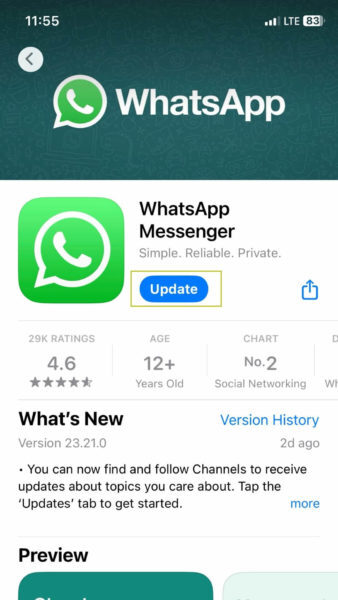
Now, you are running the latest version of WhatsApp.
We are obsessed with everything about contacts so feel free to reach out to us on info@covve.com. Our obsession led to Covve! The simplest, smartest contacts app.