How to Set Up and Use iCloud Contacts

If you are a salesperson or part of a marketing team, proper contact management is crucial. Before the advent of cloud computing, organizations and individuals used to store and manage their contacts on personal devices. However, cloud storage has made it incredibly simple to organize and retrieve contacts across devices at any given time.
iCloud is a popular cloud storage space leveraged by millions of people across the globe. You can use it to store an assortment of files, including contacts. In this article, we give you a guide on how to set up and use iCloud contacts.
How to Set Up and Use iCloud contacts
On iPhone:
Step 1. Open your iPhone and navigate to the “Settings” tab.
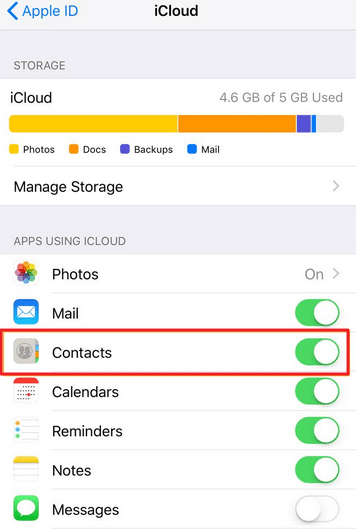
Step 2. Select your name/iCloud account, then click on “iCloud.” Now turn on “Contacts.”
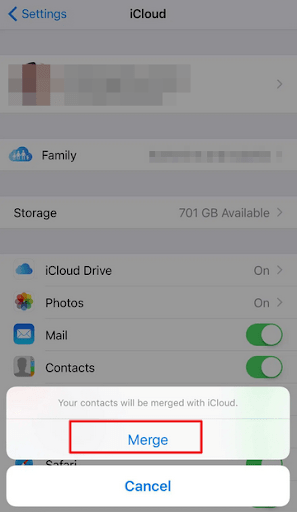
Step 3. If you are asked to merge or cancel iCloud contacts, click the “Merge” option. This way, all the information stored in your Contacts will automatically upload to your iCloud account.
On Mac:
Step 1. Open your Mac and head to the menu bar at the top of your screen.
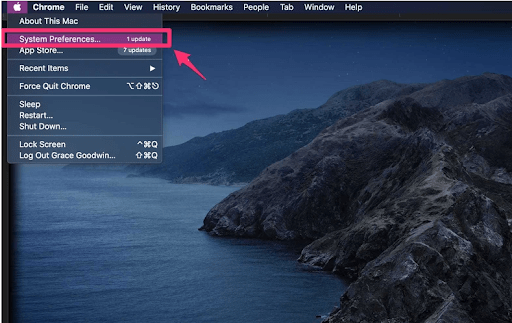
Step 2. Select the Apple menu, followed by “System Preferences”.
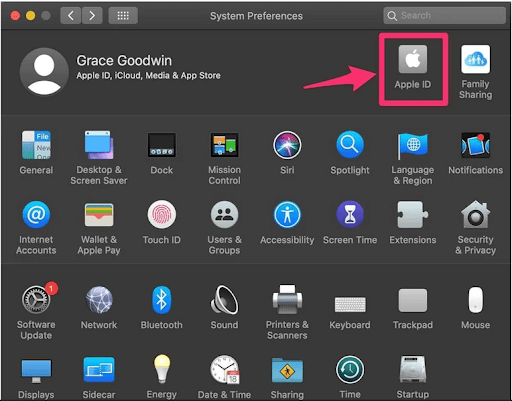
Step 3. Hit the “Apple ID” option if you are not using macOS Mojave or earlier versions. Otherwise, you don’t need to.
Step 4. Finally, hit “iCloud” and choose “Contacts.”
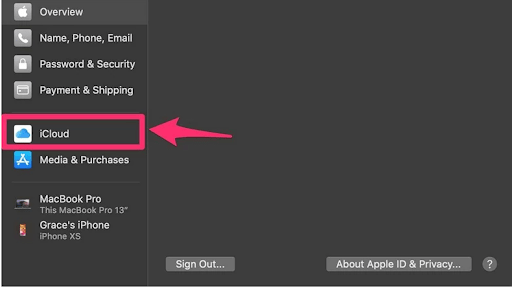
All your contacts will automatically be uploaded to iCloud!
Important points
- When you turn on iCloud Contacts on your device, whether iPhone or Mac, your contacts automatically upload to iCloud. If you make any changes to your contacts, they will update various other devices signed in using your iCloud account.
- When you turn off iCloud Contacts on your device, iCloud won’t delete your contacts but won’t automatically update them across the rest of your devices.
- If you want to add contacts from a third-party email service, you must first add that email account to the respective device and enable the “Contacts” option.
Final Thoughts
Well, the iCloud service is no doubt an excellent platform to store and manage contacts. However, if you are working with many or simply building a huge network of contacts, managing them can prove a daunting task. The best resort is to use a dedicated CRM tool like Covve, which gives you the most effective way to manage your contacts. Besides, you can get automated reminders and organize personalized weekly call schedules.